Synthetic Events: One Listener to Rule Them All
What you'll learn
- Why
onClick={fn}never attaches a listener to your button - How one pair of listeners per event type on the root container serves the whole app
- The full dispatch walk: native event → internal node → collect handlers → call them in order
- The synthetic event object: normalized wrapper,
nativeEvent, and thecurrentTargetswitcheroo - Which events are not delegated, and three special cases
- Event pooling: ancient history you can stop worrying about
Inspect a React-rendered button in DevTools and open its Event Listeners panel. Empty. Your onClick is right there in the JSX, so where did the listener go? Now click up to the container div React rendered into. There they are: dozens of listeners, one pair per event type, all attached at createRoot time (last chapter). This chapter is how that one set of listeners serves your entire tree, and what the e in your handler really is.
Your button has no listener
import { useState } from 'react';

export default function App() {
  const [count, setCount] = useState(0);
  return (
    <button onClick={() => setCount(count + 1)}>
      Count: {count}
    </button>
  );
}
What happens:
- The
onClickprop is stored as plain data on the internal node for the button. Remember, elements are just objects, and props are just fields sitting in them. - No
addEventListenercall ever happens for your button. Not at mount, not ever. - The only real click listeners in play are the pair React attached to the container at root creation: one bubble-phase, one capture-phase.
Jargon: "event delegation". Handling events for many elements with a single listener on a shared ancestor, exploiting the fact that events bubble up through ancestors. React delegates essentially every event, with the root container as the ancestor.
The dispatch walk, in detail
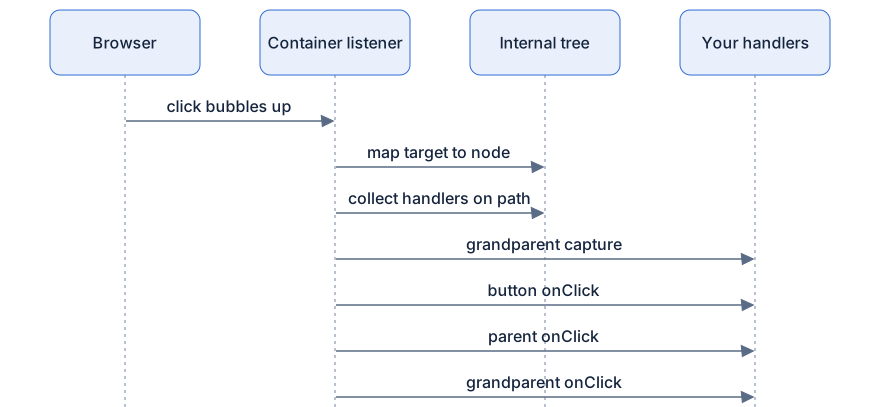
So a click lands on that button. The journey:
Step 1: the browser does its thing. The native event fires on the real target and bubbles up the DOM: button → parent div → … → your container, where React's listener is waiting.
Step 2: React maps the target back to the internal tree. Every DOM node React created is reachable from its internal node. Given event.target, React finds the corresponding internal node directly, no searching the DOM.
Step 3: React walks UP the internal tree, collecting handlers. From the target's node, React follows parent links to the root, gathering every onClickCapture and onClick prop on the path into two ordered lists.
Step 4: dispatch in order. Capture handlers fire top-down (outermost ancestor first), then bubble handlers fire bottom-up (target first), exactly the order the DOM would have produced if each element had its own listener.
Step 5: cleanup. After the last handler, the synthetic event's currentTarget is reset to null. And if this was an input event, React may restore the field's value, next chapter's story.
Pseudocode model, not real source:
Watch the order yourself
Nested divs, a button, one capture handler, and logs:
export default function App() {
  return (
    <div
      onClick={() => console.log('4. grandparent bubble')}
      onClickCapture={() => console.log('1. grandparent capture')}
    >
      <div onClick={() => console.log('3. parent bubble')}>
        <button onClick={() => console.log('2. button bubble')}>
          Click me
        </button>
      </div>
    </div>
  );
}
What happens when you click the button:
- The native click bubbles to the container; React's listener catches it.
- React maps the button DOM node to its internal node and collects the path: button → parent div → grandparent div.
- Capture pass, top-down:
1. grandparent capture. - Bubble pass, bottom-up:
2. button bubble,3. parent bubble,4. grandparent bubble.
The console shows 1, 2, 3, 4. The ordering promise is total: React dispatch order matches what native listeners on each element would have produced. Everything you know about DOM capture and bubble transfers exactly.
The synthetic event object
The e your handler receives is not the browser's event. It's React's wrapper:
Jargon: "synthetic event". A normalized, cross-browser event object React hands to your handlers. Same property names and behavior on every browser; the real browser event lives inside it as
e.nativeEvent.
- Normalized: browsers historically disagreed on event details; the wrapper smooths them over so your handler is written once.
- Deliberately familiar:
e.target,e.preventDefault(),e.stopPropagation()all work, and forward to the native event. e.nativeEvent: the escape hatch for when you truly need the browser's own object.
Now the currentTarget switcheroo, a classic confusion:
export default function App() {
  function handleClick(e) {
    console.log('sync:', e.currentTarget.tagName); // DIV
    setTimeout(() => {
      console.log('async:', e.currentTarget);      // null
    }, 0);
  }
  return (
    <div onClick={handleClick}>
      <button>Click me</button>
    </div>
  );
}
What happens:
- While your handler runs,
currentTargetpoints at the div, the node whose handler is executing, just as the DOM contract promises. React switches it before each listener on the path. - After dispatch completes, React resets it to
null. The timer callback reads the same wrapper object a tick later and findsnull.
If you need currentTarget later, capture it synchronously: const el = e.currentTarget;.
stopPropagation does double duty: it stops the remaining React handlers on the path from running and calls the native stopPropagation, so the event won't continue past the container to, say, a document listener you attached yourself.
Why delegate at all?
- Thousands of nodes, zero extra listeners. A list of 5,000 buttons costs the page exactly the same ~80 container listeners as an empty page. Mounting is faster; memory stays flat.
- Handlers work on nodes that don't exist yet. Render a new item tomorrow, the container listener already covers it. No wiring step at insertion time.
- Events can be replayed after hydration. On a server-rendered page, a click that lands before React has finished waking up can be captured at the root and replayed once the tree is ready. The server chapter shows the machinery.
- Roots stay isolated. Each root listens on its own container and maps events into its own tree. Two React apps on one page never receive each other's events (chapter 1).
The exceptions: events React does NOT delegate
Delegation needs bubbling. Some events don't bubble (or misbehave when delegated), so React attaches them directly to the element:
onScroll, scroll doesn't bubble from element to element, so the listener goes on the scrollable node itself. And no,onScrolldoes not bubble in React either: a parent'sonScrollwill not hear a child scrolling.- Media events,
onPlay,onPause,onEndedand friends: attached straight to the<video>or<audio>element. onLoad/onErroron elements like<img>and<script>, attached directly.
Three more get special treatment while still feeling normal to you:
onFocus/onBlur, nativefocusandblurdon't bubble, so React delegates their bubbling cousinsfocusinandfocusoutinstead. You writeonFocus; the plumbing differs; everything works.onMouseEnter/onMouseLeave, these don't bubble natively at all. React simulates them frommouseoverandmouseout, computing enter/leave by checking where the pointer came from and where it went. You get the non-bubbling semantics you expect, synthesized from bubbling events.
Event pooling is dead: you can unlearn it
Before React 17, synthetic events were pooled: one shared wrapper object per event type, reused across dispatches, with all fields wiped afterward. Reading any property asynchronously gave you null unless you called e.persist(). That era is over. Events are not pooled anymore, and e.persist() survives only as a harmless no-op. The one async gotcha left standing is currentTarget being nulled after dispatch, as you saw above.
Diagram
Rendered diagram (PNG hi-res):

Rendered diagram (PNG hi-res):
Common misconceptions
- Misconception:
onClick={fn}attachesfnto the element. Reality: it's stored as data; the only real listeners are the per-type pairs on the root container, attached atcreateRoottime. - Misconception: The
ein your handler is the browser's event. Reality: it's a normalized synthetic wrapper; the native one ise.nativeEvent. - Misconception:
onScrollbubbles likeonClick. Reality: scroll is attached directly to the element and does not bubble, in the DOM or in React. - Misconception:
onMouseEnteris the nativemouseenter. Reality: React simulates enter/leave frommouseover/mouseout, because the natives don't bubble. - Misconception: You must call
e.persist()to use an event asynchronously. Reality: pooling ended in React 17 andpersistis a no-op; the one surviving trap iscurrentTargetbeing nulled after dispatch. - Misconception:
stopPropagation()only affects React handlers. Reality: it also calls the native method, stopping the event from traveling beyond the container.
Why it works this way
- Delegation scales to any tree size. Listener count is constant whether you render ten nodes or ten thousand, mount cost and memory stay flat.
- The internal tree makes dispatch exact. React already knows the component path from target to root; walking it reproduces capture/bubble ordering precisely, with zero DOM searching.
- Normalization writes cross-browser code once. The wrapper absorbs browser differences so your handlers don't.
- Per-listener
currentTargetpreserves the DOM contract. Even though one listener does everything, your handler sees the samecurrentTargetit would have seen natively. - Non-bubbling events get honest treatment. Direct attachment and simulation keep
onScroll,onFocus, andonMouseEntersemantics intact instead of pretending they bubble. - Root-level capture enables hydration replay. Because everything funnels through the container, events that arrive before the tree is ready can be queued and replayed later.
Try it yourself
- Render the nested-divs example. Before clicking, write down the exact log order you expect, then click the button and compare.
- In DevTools, inspect the button from the first example and open the Event Listeners panel: nothing on the button. Inspect the container:
click(bubble and capture) plus dozens more. - Run the
currentTargettimer example and reproduce theasync: nulllog. Fix it by capturingconst el = e.currentTargetsynchronously and loggingelin the timeout. - Add a
document.addEventListener('click', ...)inside an effect, plus a button whoseonClickcallse.stopPropagation(). The document listener stays silent for that button, proof the native call was made. Then comment out thestopPropagationand watch it fire.
Recap
onClickis data, not a listener. React listens once per event type (capture + bubble) on the root container.- Dispatch: native event bubbles to the container → target maps to its internal node → React walks up the internal tree collecting handlers → capture fires top-down, bubble bottom-up.
- The synthetic event is a normalized wrapper with
e.nativeEventinside;currentTargetis switched per listener and nulled after dispatch, async reads getnull. stopPropagationworks within the React tree and calls the native method.- Delegation buys: constant listener count, handlers for not-yet-existing nodes, hydration replay, and root isolation.
- Not delegated:
scroll, media events,load/error.focus/blurdelegate viafocusin/focusout;mouseenter/mouseleaveare simulated frommouseover/mouseout. - Event pooling is pre-17 history;
e.persist()is a no-op.