The Suspense Mental Model
What you'll learn
- What
<Suspense>actually declares (it's simpler than its reputation) - The try/catch analogy: components throw "not ready yet", boundaries catch it
- What "ready" means: code (lazy bundles) and data (promises)
- What Suspense is not, and the myths to unlearn
- How Suspense replaces the
isLoadingboolean pattern
The contract is smaller than the reputation: Suspense is one declarative sentence. The rest of this chapter, and the next four, unpack it.
The one-sentence idea
import { Suspense } from 'react';
import { Spinner } from './Spinner';
import { Profile } from './Profile';

export default function App() {
  return (
    <Suspense fallback={<Spinner />}>
      <Profile />
    </Suspense>
  );
}
That JSX says exactly one thing:
"If anything inside this box isn't ready yet, show this fallback instead."
That is the entire API. fallback is what to show while waiting. The children are what to show when they're ready. Suspense is the boundary between those two states.
Jargon: "Suspense boundary". The region of the tree wrapped in
<Suspense>. If any component inside the boundary reports "I'm not ready", the boundary swaps to its fallback. Components outside the boundary are completely unaffected.
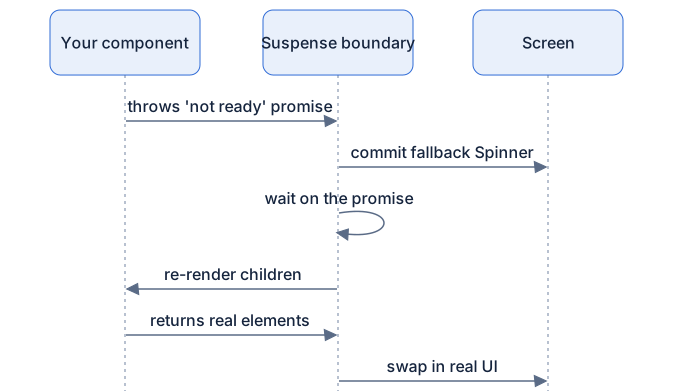
What happens:
- React starts rendering
Profile. - Something inside
Profilesays "not ready yet" (you'll learn the exact mechanism next chapter). - React walks up the tree to the nearest
<Suspense>, our boundary. - React shows
<Spinner />in place of the boundary's children. - When the thing becomes ready, React re-renders the children and swaps in the real
Profile.
Notice what you did not write: no if (loading) check, no state, no effect. The "pending" concern lives in one place, the boundary, instead of being smeared across every component.
The analogy you already know: try/catch
You already understand this control flow from error handling:
try {
  const data = JSON.parse(maybeBroken); // might throw
  render(data);
} catch (error) {
  showError(error);
}
JSON.parse doesn't return an error, it throws one, and the nearest enclosing catch handles it. The throwing code doesn't know who catches; the catching code doesn't know what threw. They're decoupled by the throw.
Suspense is the same pattern, rotated 90 degrees:
Components throw their "not ready yet" state. Boundaries catch it.
A component that needs data it doesn't have yet doesn't return a spinner, doesn't set a flag, it throws its not-readiness (a promise, as you'll see next chapter) and lets the nearest boundary above decide what to show. Just like catch, the boundary doesn't care which descendant threw or why; it just shows the fallback until things are ready.
This decoupling is the point. Your Profile component can say "I need a user" without knowing anything about spinners, and your boundary can say "show a spinner" without knowing anything about users.
What does "ready" mean?
Two kinds of things can be un-ready, and Suspense handles both identically:
1. Code that hasn't arrived. With React.lazy, a component's code lives in a separate bundle that must be downloaded:
import { Suspense, lazy } from 'react';
import { Spinner } from './Spinner';

// The code for AdminPanel loads on demand, not upfront
const AdminPanel = lazy(() => import('./AdminPanel'));

export default function App() {
  return (
    <Suspense fallback={<Spinner />}>
      <AdminPanel />
    </Suspense>
  );
}
What happens: the first time AdminPanel renders, its code isn't here yet, so it reports "not ready". The boundary shows the spinner. When the download finishes, the panel appears. The code itself was the thing being awaited.
2. Data that hasn't arrived. A component can read a promise during render with the use() hook, or through a Suspense-aware data library (many routers and data frameworks are):
import { Suspense, use } from 'react';
import { Spinner } from './Spinner';
import { fetchUser } from './api';

function Greeting({ userPromise }) {
  const user = use(userPromise); // suspends until this resolves
  return <h1>Hello, {user.name}!</h1>;
}

export default function App() {
  return (
    <Suspense fallback={<Spinner />}>
      <Greeting userPromise={fetchUser(1)} />
    </Suspense>
  );
}
What happens: use(userPromise) either returns the user right now or reports "not ready" to the boundary. Same machinery as the lazy bundle, a promise is a promise, whether it represents "downloading code" or "fetching a user".
What Suspense is NOT
Half the confusion around Suspense comes from myths. Drop them now:
- Suspense is not a data fetching library. It never fetches anything. It doesn't know what a network is. It only coordinates the display of things that are already fetching. The fetching is done by your own code, a router, or a data library.
- Suspense is not a loading-boolean manager. You don't tell it "loading is true now". Components declare their needs during render; the boundary notices unmet needs. It's push, not pull.
- Suspense is not tied to any fetching approach.
fetch, axios, GraphQL, a router loader, a WebSocket, anything that produces a promise can participate. Suspense is a display primitive, not a network primitive.
Before and after: the user card
The pattern most React codebases end up writing:
import { useState, useEffect } from 'react';
import { Spinner } from './Spinner';
import { fetchUser } from './api';

export function UserCard({ userId }) {
  const [user, setUser] = useState(null);
  const [isLoading, setIsLoading] = useState(true);

  useEffect(() => {
    let ignore = false;
    setIsLoading(true);
    fetchUser(userId).then((result) => {
      if (!ignore) {
        setUser(result);
        setIsLoading(false);
      }
    });
    return () => { ignore = true; };
  }, [userId]);

  if (isLoading) return <Spinner />;
  return (
    <div className="card">
      <h2>{user.name}</h2>
      <p>{user.bio}</p>
    </div>
  );
}
It works. But look at what the component is burdened with: a state slot for data, a state slot for the flag, an effect with a cleanup race guard, and an early return that forks the UI in two. Every data-driven component in the app repeats this ceremony, and every one can get it subtly wrong (stale responses, forgotten resets on userId change…).
The Suspense version moves the pending concern out of the component and into the boundary:
import { Suspense, use } from 'react';
import { Spinner } from './Spinner';

function UserCard({ userPromise }) {
  const user = use(userPromise); // ready? return it. not ready? boundary handles it.
  return (
    <div className="card">
      <h2>{user.name}</h2>
      <p>{user.bio}</p>
    </div>
  );
}

export function UserCardSection({ userPromise }) {
  return (
    <Suspense fallback={<Spinner />}>
      <UserCard userPromise={userPromise} />
    </Suspense>
  );
}
What happens:
UserCardis written as if the data is always there, because from its perspective, it is. The function only ever completes when the data exists.- If the promise isn't resolved when
use()runs, the "not ready" signal goes to the boundary, which shows the spinner. - The component has zero loading states, zero effects, zero cleanup logic.
Read UserCard again. It describes one thing: what a user card looks like. That's the declarative ideal React has been aiming at since the beginning. Suspense finally extends it to asynchronous data.
Where does the real content go while the fallback shows?
A natural worry: when the spinner replaces Profile, is the half-built Profile thrown away?
No. While the fallback is on screen, React keeps working on the real tree in the background. When the promise resolves, React re-renders the boundary's children, and if that render completes, it swaps the finished tree in. Even better: if the real content had already been on screen once (say you're re-fetching), React can keep it mounted but hidden, preserving its state and DOM, and reveal it later intact. Chapter 3 of this part shows that hidden-tree behavior with a demo where a counter survives being suspended.
For now, hold this picture: the fallback is a placeholder layer, not a deletion. The real UI is being prepared underneath.
Diagram
Rendered diagram (PNG hi-res):

Rendered diagram (PNG hi-res):
Common misconceptions
- Misconception: Suspense fetches your data. Reality: Suspense never fetches. It only displays fallbacks while things you started elsewhere are in flight.
- Misconception: Suspense is only for
React.lazycode splitting. Reality: code and data are the same mechanism to a boundary, anything represented by a promise can suspend. - Misconception: You must rewrite your app to use Suspense. Reality: boundaries are opt-in and composable; you can wrap one widget and leave everything else alone.
- Misconception: The
fallbackprop is a loading state you manage. Reality: you never toggle it; the boundary shows it automatically whenever anything inside is un-ready. - Misconception: When the fallback shows, the real tree is destroyed. Reality: the real content is built in the background, and an already-visible tree can be kept mounted-but-hidden with its state intact.
- Misconception: Suspense replaces error handling. Reality: "not ready" and "failed" are different signals with different boundaries, Suspense catches the first, error boundaries (chapter 5) catch the second.
Why it works this way
- Declarative beats boolean bookkeeping. A hand-rolled
isLoadingflag can disagree with reality (forgot to reset it, stale closure, race between two fetches). A boundary can't disagree, it derives pending-ness from the render itself. - Throwing decouples the needing from the handling.
Profileshouldn't know what your app's spinner looks like, and your spinner shouldn't know what a profile is. The thrown promise is the narrow interface between them. - One boundary, any depth. Whether one component suspends or twelve do, one boundary covers them. You get to choose the granularity of loading UI as a design decision, not as a side effect of where your
if (loading)checks happen to be. - Purity makes it safe to throw. Renders are throwaway calculations (Part 2). Discarding a half-rendered tree costs nothing and corrupts nothing, which is why "throw and retry" is a viable strategy at all.
Try it yourself
- Wrap an existing component that uses
useEffect+isLoadingin a<Suspense fallback>instead, usinguse()to read a cached promise. Count the lines you deleted. Expected: the component gets dramatically shorter, and the behavior stays the same. - Render
<Suspense fallback={<p>outer</p>}><Suspense fallback={<p>inner</p>}><LazyThing /></Suspense></Suspense>. Which fallback appears? Expected:inner, the nearest boundary wins. - Put a
console.log('rendered')inside a component that suspends. Trigger it. Expected: you see the log fire on the attempt that suspends and again on the retry after resolution, proof the first render was discarded and redone.
Recap
<Suspense fallback={...}>declares: "if anything inside isn't ready, show this instead."- Components throw their not-ready state; boundaries catch it, try/catch for pendingness.
- "Ready" covers two things: code (
lazybundles) and data (promises read withuse()or a Suspense-aware library). - Suspense is not a fetching library, a boolean manager, or tied to any fetching approach.
- Suspense moves the pending concern out of every component and into one boundary.
- While the fallback shows, the real content is being built in the background.