Selective Hydration
What you'll learn
- Why hydration is not one big blocking job, but many small ones
- How Suspense boundaries divide your page into separately-hydratable islands
- The killer feature: what happens when a user clicks before hydration finishes
- Which events get prioritized and which get recorded and replayed
- What a hydration mismatch is, what causes it, and how to fix each cause
- The three states a server Suspense boundary can be in when hydration reaches it
Last chapter ended on an uncomfortable note: hydration makes the whole tree render once in the browser before the page is truly alive. If that were the full story, a big page would be one long uncanny valley. But hydration in modern React is not all-or-nothing. It happens incrementally, it can be interrupted, it can be reprioritized mid-flight, and Suspense boundaries are the units it works in.
The unit of hydration: the Suspense boundary
Recall the Suspense contract from Part 5: "if anything inside this box isn't ready, show the fallback." On the server, that contract gets a second life. Each boundary's content can be rendered, streamed (chapter 5), and hydrated independently of everything else.
import { Suspense } from 'react';
import { Comments } from './Comments';
import { Post } from './Post';
import { Spinner } from './Spinner';

export default function PostPage() {
  return (
    <main>
      <Post />
      <Suspense fallback={<Spinner />}>
        <Comments />
      </Suspense>
    </main>
  );
}
What happens:
- React hydrates the shell first:
<main>,<Post />, and the boundary's fallback<Spinner />, everything outside the boundary, plus the placeholder standing inside it. - The
<Comments />region becomes its own hydration task, queued separately. - React hydrates that region when it can: when its HTML has arrived and its code has downloaded, and when nothing more urgent is happening.
Jargon: "shell". The part of the page outside all Suspense boundaries, plus each boundary's fallback. The shell is guaranteed to be present in the first HTML and hydrates first.
The crucial shift: a slow comments section no longer blocks the article from becoming interactive. Hydration stops being one monolithic job and becomes a set of islands, and islands can be handled one at a time, in priority order.
Islands hydrate as their pieces arrive
A boundary's content can only hydrate when two things are present in the browser:
- its HTML (which may still be streaming from the server, chapter 5), and
- its JavaScript (which may still be downloading).
React tracks both per boundary. The moment both exist for <Comments />, that island can hydrate, while a different, slower island keeps waiting. Your page becomes interactive progressively: the header works, then the article, then the comments, each on its own schedule.
And because hydration is just rendering, a process you know from Part 4 is interruptible and prioritized, these island tasks play by the same rules as any other work: urgent things can jump the queue.
The killer feature: events during hydration
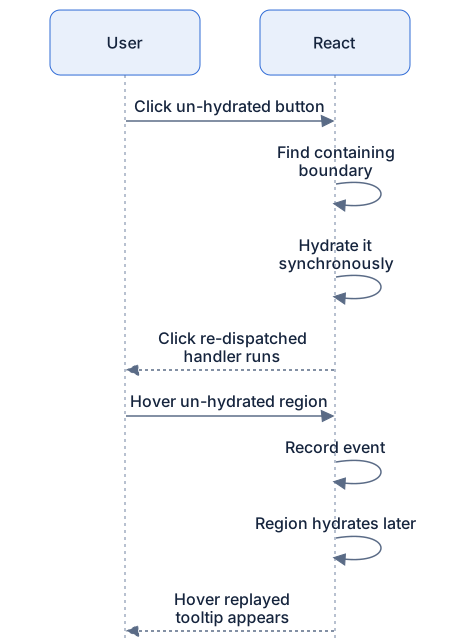
Suppose the HTML has painted, hydration is working through the tree, and the user clicks a button inside a region that hasn't hydrated yet. Old mental model: "the click is lost, too bad." Reality: React is already listening at the root, and it treats that click as a signal.
Jargon: "selective hydration". React's ability to hydrate boundaries out of order, driven by what the user is actually trying to interact with, instead of strictly top-to-bottom.
What happens (discrete events, clicks, taps, key presses):
- The user clicks a button inside the not-yet-hydrated
<Comments />region. - React's root-level listener catches the event and identifies which boundary contains the click target.
- React prioritizes that boundary: for a discrete event, it hydrates that island synchronously, right now, jumping ahead of everything else in the queue.
- The moment the island is hydrated, listeners attached, the click is re-dispatched into it. The user's click lands.
What happens (continuous events, mouseover, scroll, pointermove):
- The user hovers across a not-yet-hydrated region.
- These events fire constantly and aren't worth a synchronous rush for each one, so React records them.
- When that region finishes hydrating, React replays the recorded events against the now-live components, in order.
- Tooltips, hover menus, and focus states behave as if the region had been alive the whole time.
The design goal in one sentence: an early user should never be punished for interacting with a page that looks ready. Click what you see, React hurries that exact piece to life. Hover what you see, React takes notes and catches up.
Pseudocode model, not real source:
When the two trees disagree: mismatches
Hydration's claiming walk (last chapter) is built on one assumption: the client's first render must produce the same tree the server rendered. When it doesn't, you get a hydration mismatch.
Common causes:
- Values that differ per run.
Date.now(),Math.random(), locale-formatted dates, the server's render and the client's render genuinely produce different output. - Browser-only checks during render.
typeof window !== 'undefined' ? <A/> : <B/>, or readinglocalStorage/window.innerWidthin render. The server took one branch; the client takes the other. - HTML modified before React sees it. Browser extensions injecting nodes, or the browser itself "fixing" invalid markup before hydration's walk begins.
- Invalid nesting generally. Server sent
<p><div>…</div></p>; the HTML parser hoisted the<div>out (paragraphs can't contain blocks); now the walk's "next node" isn't what React expected. Same story for a<div>inside<tr>'s implicit table structure.
What happens on mismatch:
- The claiming walk hits a node that doesn't fit, wrong tag, missing node, extra node.
- React gives up on adoption for that subtree: it discards the server DOM there and client-renders it from scratch.
- In development, you get a loud warning telling you the trees disagreed.
- The user may see a brief flash in that region, and any DOM-held state (typed text, scroll position) inside it is lost.
The rest of the page is unaffected. Mismatches are contained to their subtree, not fatal to the page. Contained, but still worse than adopting: slower, flashier, and state-losing. Worth fixing.
Fixing mismatches
Each cause has a standard cure:
Render browser-only values after mount. A mounted flag plus an effect means the first client render matches the server exactly; the differing value arrives on the second render, which is a normal update:
import { useEffect, useState } from 'react';

export default function WidthBadge() {
  const [width, setWidth] = useState(null);

  useEffect(() => {
    setWidth(window.innerWidth); // runs only in the browser, after hydration
  }, []);

  return <span>{width === null ? 'Window' : `Window: ${width}px`}</span>;
}
What happens: the server render and the first client render both produce <span>Window</span>, adoption succeeds. Then the effect sets state and React updates the text as an ordinary re-render. No mismatch, because the first render agreed.
Suppress a known-OK difference. For content you know differs and is harmless, the classic timestamp, there's a one-attribute escape hatch:
export default function LastUpdated({ iso, display }) {
  return (
    <time dateTime={iso} suppressHydrationWarning>
      {display}
    </time>
  );
}
What happens: React still adopts the node but skips warning about text/attribute differences on that one element only. It does not extend to children. Use sparingly: it silences the smoke detector; it doesn't put out fires.
Keep renders deterministic. Same input → same output, on both sides. Move per-request randomness into data fetched once, not into render.
Boundary states on the server
When hydration reaches a Suspense boundary, that boundary was in one of three states on the server, and each leads somewhere different:
- Content streamed and present. Normal path: hydrate the island as soon as its JS is ready.
- Content still streaming. The HTML shows the fallback with special markers (chapter 5 shows the mechanics). React hydrates the fallback now and the real content when its HTML and JS arrive.
- Errored on the server. The boundary couldn't render at all, the database call failed, say. The server marks it failed; React doesn't even try to adopt. It client-renders that island from the start, as if the server had never attempted it. One region fails; the rest of the page hydrates normally.
Diagram
Rendered diagram (PNG hi-res):

Rendered diagram (PNG hi-res):
Common misconceptions
- Misconception: Hydration is one big all-or-nothing pass. Reality: the shell hydrates first, and each Suspense boundary is an independent island with its own timing.
- Misconception: Clicks before hydration finishes are lost. Reality: discrete events trigger prioritized hydration of exactly that region and then land; continuous events are recorded and replayed.
- Misconception: A mismatch breaks the whole page. Reality: only the mismatched subtree is discarded and client-rendered, with a dev warning, a possible flash, and lost DOM state in that region.
- Misconception:
suppressHydrationWarningfixes mismatches. Reality: it only silences the warning on one element's own text and attributes. It changes no behavior and covers nothing below that element. - Misconception: A boundary that errored on the server kills hydration. Reality: it's marked failed and client-rendered from the start; sibling islands hydrate normally.
- Misconception: You should wrap everything in Suspense to get islands. Reality: boundaries have costs, fallback flashes, coordination overhead. Wrap the parts that are genuinely slower or optional, not every div.
Why it works this way
- Boundaries were already the right seams. Suspense already meant "this region has its own readiness." Hydration reuses that seam instead of inventing a second one, one concept, two jobs.
- Interactivity should follow attention. Top-to-bottom hydration spends effort on the footer while the user is clicking the header. Event-driven prioritization spends hydration effort where the user provably is.
- Recording beats dropping. A framework that loses early input trains users to distrust fast-looking pages. Replay makes "looks ready" and "is ready" converge.
- Mismatch = adopt nothing, rebuild locally. Once two trees disagree, guessing correspondences is hopeless; a clean rebuild of just that subtree is the cheapest correct answer.
Try it yourself
- In an SSR+Suspense app (a page with an artificially slow data fetch works), throttle your network and click a button inside a slow region the moment its HTML appears. Expected: it responds, possibly after a beat while React synchronously hydrates that island, instead of being dead.
- Render
new Date().toLocaleTimeString()directly in a server-rendered component's JSX. Load with the console open. Expected: a hydration mismatch warning in development. - Fix the same component two ways: (a) a mounted flag + effect, (b)
suppressHydrationWarningon just the time element. Expected: both silence the warning, but notice (a) actually updates the text after mount, while (b) leaves the server's text in place. - Render
<p><div>oops</div></p>from a server-rendered page. Expected: a mismatch warning even though both sides rendered identical JSX, the browser's HTML parser relocated the<div>before React ever saw it. This is why valid nesting matters.
Recap
- Hydration is incremental: shell first, then each Suspense boundary as its own island, when its HTML and JS are ready.
- Click an un-hydrated region: React prioritizes and synchronously hydrates it, then delivers your click.
- Hover or scroll an un-hydrated region: events are recorded and replayed once it hydrates. Early input is never lost.
- Mismatch = client tree ≠ server HTML → that subtree is discarded and client-rendered, with a dev warning and a possible flash.
- Fix mismatches with deterministic renders, a mounted flag + effect for browser-only values, or
suppressHydrationWarningfor known-OK single-element differences. - A boundary that errored on the server is simply client-rendered from the start, the rest of the page hydrates fine.