Boundaries and Retries
What you'll learn
- Why where you put a boundary is a design decision, not an afterthought
- One big boundary vs many small ones: all-or-nothing vs progressive reveal
- Why sibling boundaries never block each other
- The surprising truth: suspended content keeps its state (mounted but hidden)
- What waterfalls are, why they hurt, and three ways to fix them
- How a boundary tracks what it's waiting for
You now know the mechanism: throw a promise, catch at a boundary, retry on resolution. This chapter is about the skill that separates "uses Suspense" from "designs with Suspense": placement. The boundary is a load-bearing piece of UX design. It decides what the user sees while waiting, what stays on screen, and how much of your page a single slow request can hold hostage.
Granularity: the big dial you get to turn
Option A, one boundary around everything:
import { Suspense } from 'react';
import { FullPageSpinner } from './Spinner';
import { Header } from './Header';
import { Sidebar } from './Sidebar';
import { Feed } from './Feed';

export default function Dashboard() {
  return (
    <Suspense fallback={<FullPageSpinner />}>
      <Header />
      <Sidebar />
      <Feed />
    </Suspense>
  );
}
What happens: the slowest piece of data anywhere in the tree gates the entire page. Header ready in 50ms, sidebar in 100ms, feed in 2 seconds? The user stares at a full-page spinner for 2 seconds, then sees everything at once. Clean, simple, and usually mediocre UX, the app feels slower than it is.
Option B, many small boundaries:
import { Suspense } from 'react';
import { SectionSpinner } from './Spinner';
import { Header } from './Header';
import { Sidebar } from './Sidebar';
import { Feed } from './Feed';

export default function Dashboard() {
  return (
    <>
      <Suspense fallback={<SectionSpinner label="header" />}>
        <Header />
      </Suspense>
      <div className="layout">
        <Suspense fallback={<SectionSpinner label="sidebar" />}>
          <Sidebar />
        </Suspense>
        <Suspense fallback={<SectionSpinner label="feed" />}>
          <Feed />
        </Suspense>
      </div>
    </>
  );
}
What happens: each section pops in as soon as its data lands. The header appears at 50ms, the sidebar at 100ms, the feed at 2s. The page feels fast even though the total time is identical.
The tradeoff, honestly stated:
- Big boundary, one spinner, no layout shift, content arrives as a coherent whole. Good when sections are meaningless without each other.
- Small boundaries, progressive reveal, perceived speed, but spinners scattered around and layout jumping as sections arrive. Good when sections are independently useful.
Neither is "correct". The point is that you choose, declaratively, per region, instead of the choice being made accidentally by wherever your if (loading) checks ended up.
Sibling boundaries are independent
This falls out of the mechanism but is worth saying out loud: a thrown promise travels up, never sideways. If the sidebar suspends, React finds the sidebar's boundary and shows its fallback. The feed's boundary never hears about it.
A slow sidebar never blocks the main feed.
This is what makes Suspense composable. You can wrap a third-party widget in its own boundary and know, with certainty, that its loading behavior is quarantined. It cannot spin-ify anything outside its box, and nothing outside can spin-ify it.
Nesting: the nearest boundary wins
Boundaries can contain boundaries:
<Suspense fallback={<PageSpinner />}>
  <Article />
  <Suspense fallback={<CommentsSpinner />}>
    <Comments />
  </Suspense>
</Suspense>
What happens:
- If
Commentssuspends, the inner boundary catches it (nearest wins). The article stays visible; only the comments area shows a spinner. - If
Articlesuspends, the outer boundary catches it, and since the inner boundary is inside the outer one's children, the whole region (article + comments) is replaced by the page spinner.
There's a subtlety you'll fully appreciate after the transitions chapter: an inner boundary that's already showing content behaves differently from one still mounting when something inside re-suspends. React is reluctant to replace visible content with a fallback. For now, file away: nearest boundary wins on the way up, and "already visible" content gets special treatment. The next chapter makes that rule precise.
Suspended content keeps its state: seriously
When content has been on screen and then its boundary shows a fallback again (say you triggered a refetch), React does not destroy the real tree. It keeps it mounted but hidden:
- Its state is preserved, every
useStatevalue survives. - Its DOM nodes are preserved, they're hidden with
display: none, not removed. - When the new data is ready, the tree is revealed, not rebuilt.
Jargon: "hidden tree". The real content of a boundary, kept alive in the background (state and DOM intact) while a fallback occupies its visual slot. Revealed when ready, as if it never left.
Watch it with a demo, a counter inside a section you can force to suspend:
import { Suspense, use, useState } from 'react';

let slowPromise = null;
let slowResult = null;

function fetchSlow() {
  slowPromise = new Promise((resolve) => {
    setTimeout(() => {
      slowResult = 'Fresh data arrived!';
      resolve(slowResult);
    }, 2000);
  });
}

function SlowData() {
  if (slowResult === null) {
    use(slowPromise); // suspends for 2 seconds
  }
  return <p>{slowResult}</p>;
}

function Counter() {
  const [count, setCount] = useState(0);
  return (
    <button onClick={() => setCount((c) => c + 1)}>
      Count: {count}
    </button>
  );
}

export default function Demo() {
  const [round, setRound] = useState(0);

  return (
    <div>
      <button
        onClick={() => {
          slowResult = null;
          fetchSlow();
          setRound((r) => r + 1); // re-render → SlowData suspends again
        }}
      >
        Refetch (suspends for 2s)
      </button>

      <Suspense fallback={<p>Loading…</p>} key={round}>
        <Counter />
        <SlowData />
      </Suspense>
    </div>
  );
}
What happens:
- Click the counter a few times, say, up to 5.
- Click "Refetch". The section suspends; the fallback shows for 2 seconds.
- The content returns... and the counter still says 5.
If React had unmounted the tree, the counter would have reset to 0. It didn't, because the tree was merely hidden, state, DOM, everything. (The key={round} here re-mounts the boundary's element position each round to re-trigger the suspend cleanly for the demo; the state inside lives on the hidden tree that React preserves across the suspend/reveal cycle.)
This is a deliberate design choice: suspending is a visual state, not a lifecycle event. Nothing is torn down; the app underneath the spinner is still your app.
Waterfalls: the accidental serialization
Now the failure mode. Suspense makes it easy to write this without noticing:
// SLOW — fetches happen one after another
function ProfilePage({ userPromise }) {
  const user = use(userPromise);        // waits for the user...
  return (
    <div>
      <h1>{user.name}</h1>
      <PostsList postsPromise={fetchPosts(user.id)} />  {/* ...THEN starts posts */}
    </div>
  );
}
What happens:
- Render suspends on
userPromise. Wait 300ms. - User arrives; render completes far enough to call
fetchPosts(user.id). Now the posts request starts. PostsListsuspends on the posts promise. Wait another 300ms.
Total: 600ms of sequential waiting for two requests that could have run in parallel. This is a waterfall, each fetch only begins after the previous one resolves, because each fetch is triggered by a render that couldn't happen yet.
Jargon: "waterfall". A chain where request B doesn't start until request A finishes, because B is only created after A's data renders. The network timeline looks like a staircase instead of parallel bars.
Fix 1, start everything before render, read during render:
function ProfilePage({ userPromise, postsPromise }) {
  const user = use(userPromise);     // both promises were already
  const posts = use(postsPromise);   // created by the parent — parallel!
  return (
    <div>
      <h1>{user.name}</h1>
      <PostsList posts={posts} />
    </div>
  );
}
The parent fires both requests immediately; render just reads them. Total wait: max(300, 300) = 300ms, not 600.
Fix 2, prefetch on interaction. Start the fetch when the user hovers or focuses a link, not when the component renders. By the time they click, the data is often already there.
Fix 3, lift fetching to a router or data library. Framework routers typically start all of a route's data requirements the moment navigation begins, then hand stable promises down. This is the same idea as Fix 1, institutionalized so you can't forget it.
The general principle: initiate fetching as early as possible (events, route changes), and use render only to read. Render-triggered fetching is what creates waterfalls.
How the boundary tracks its retries
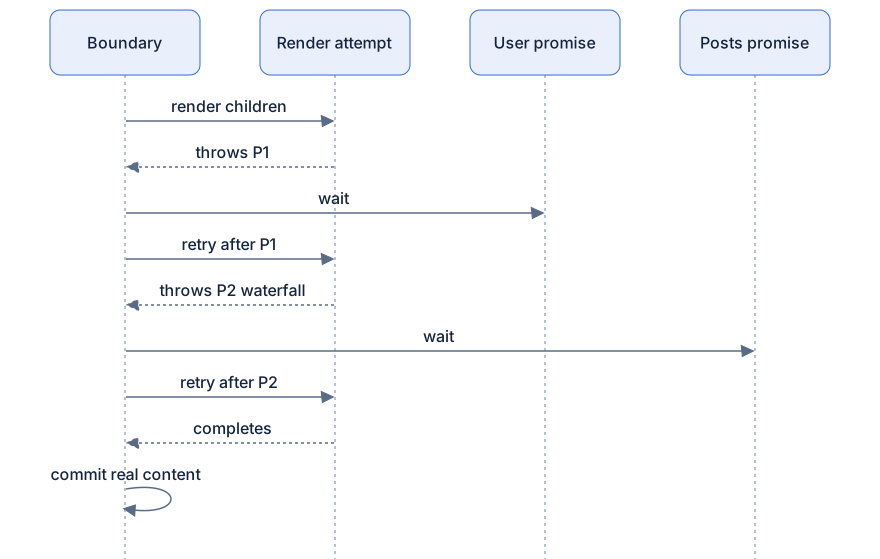
One boundary can catch several thrown promises in a single render pass, UserCard and PostsList might both suspend under the same boundary. What does the boundary do, collect them?
Conceptually, yes:
Pseudocode model, not real source:
Each resolution schedules a retry attempt. If the retry throws new promises (hello, waterfall), they join the set and the cycle continues. Only when a full render of the children completes with zero throws does the real content commit. The boundary isn't counting promises like a checklist, it's using "did the render complete?" as the definition of ready. Strict, and exactly as strict as it needs to be.
Diagram
Rendered diagram (PNG hi-res):

Rendered diagram (PNG hi-res):
Common misconceptions
- Misconception: Fewer boundaries is always better for performance. Reality: boundaries are nearly free; the cost model is UX (spinner count, layout shift), not runtime overhead.
- Misconception: A suspending child takes down its siblings. Reality: thrown promises travel up to the nearest boundary; sibling boundaries are fully independent.
- Misconception: When a fallback shows, the real tree unmounts and loses state. Reality: React keeps the tree mounted-but-hidden, state and DOM survive, and the tree is revealed intact.
- Misconception: Waterfalls mean Suspense is slow. Reality: waterfalls come from starting fetches during render; start them earlier (parallel creation, prefetch, router loaders) and Suspense is as fast as your slowest single request.
- Misconception: The nearest boundary is always the right one. Reality: placement is a design choice, sometimes you want an outer boundary to catch everything so a section reads as one unit.
- Misconception: A boundary needs one retry per promise. Reality: each resolution schedules an attempt, and an attempt that throws again simply waits on the new set, retries are cheap, disposable renders.
Why it works this way
- Boundaries turn loading UX into layout. Where spinners appear is expressed in the tree itself, reviewable in JSX, movable in a refactor, not scattered through component internals.
- Independence comes free from tree structure. "Up, not sideways" is how exceptions already work; Suspense inherits a battle-tested scoping rule.
- Hidden trees honor the user's work. Losing form input, scroll position, or counter state because a refetch happened would be hostile. Preservation makes refetches feel instant and safe.
- "Did the render complete?" is the only readiness test that cannot lie. Any bookkeeping scheme (counting promises, tracking sources) can disagree with what components actually need. Completing a render cannot disagree, it's the definition.
- Waterfalls are visible in this model. Because fetching-during-render is what serializes requests, the fix, fetch on events, read on render, becomes a teachable rule instead of a mystery.
Try it yourself
- Build the counter demo and click "Refetch" after counting to 7. Expected: the fallback shows, then the content returns still reading 7. Then remove the
Suspensewrapper and let it crash, feel the difference. - Wrap an entire page in one boundary, then split it into three. Throttle your network to "Slow 3G" in DevTools and reload both versions. Expected: identical total time, dramatically different feel.
- Write the waterfall version (fetch posts using the resolved user's id inside render), open the network tab, and observe the staircase. Then create both promises in the parent and observe two requests firing together.
- Suspend two different components under one boundary with different delays. Expected: the fallback persists until the slower one resolves, the definition of "render completes".
Recap
- Boundary placement is design: one big boundary = all-or-nothing, many small ones = progressive reveal.
- Sibling boundaries are independent, a slow sidebar never blocks the feed.
- The nearest boundary above the suspending component wins; already-visible content gets special treatment (next chapter).
- Suspended content is kept mounted but hidden: state and DOM are preserved and revealed intact.
- Waterfalls come from starting fetches during render; fix by creating promises before render, prefetching on interaction, or lifting fetching to a router.
- A boundary waits on a set of thrown promises; each resolution schedules a fresh render attempt, and only a throw-free render commits.